Wallet Passes for Business: What They Are and How to Use Them
A wallet pass is a digital card that lives in Apple or Google Wallet - no app download required. Here is what businesses use them for, how they work, and why the push notification open rate changes the economics of every re-engagement campaign you run.

A wallet pass is a digital card that lives in the Apple or Google Wallet app on a customer's phone. It can hold a loyalty balance, a reward voucher, a membership card, an event ticket, or a discount - and it sits on the home screen, resurfaces at the lock screen, and can receive push notifications from the issuing business at any time.
For businesses, that last part matters most. The average marketing email open rate sits around 20%. A loyalty app requires the customer to find it in an app store, download it, create an account, and log in - and most will not. A wallet pass push notification opens at approximately 99%, because it appears as a native lock screen alert on the customer's phone, not an email fighting for attention in a promotions folder.
"Digital tends to work better once you want to track things or make it easier for people to come back without carrying anything. A lot of it comes down to whether you just want something simple or something you can actually learn from and build on over time." — r/smallbusiness
What a Wallet Pass Actually Is
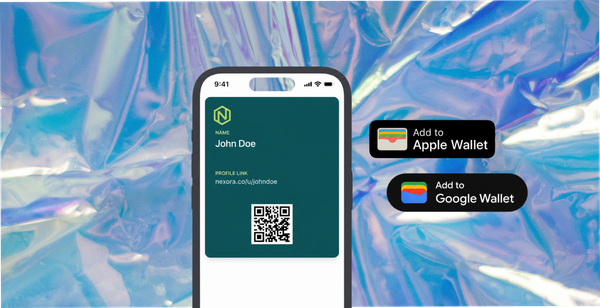
A wallet pass is a file issued by a business and installed on a customer's phone by tapping a link. No download required. No account creation. No login. The customer taps the link, sees a native "Add to Wallet" prompt on their device, and the card installs in seconds.
Once installed, the pass sits in the Apple or Google Wallet app alongside payment cards and boarding passes. The issuing business can update the card remotely at any time - changing a loyalty balance, adding a reward, sending a push notification before an expiry date. The customer sees the updated card without taking any action.
The underlying technology is Apple's Wallet Kit framework (for iPhone) and the Google Wallet API (for Android). Third-party platforms handle the technical generation so businesses can issue and update passes without any development work. PassKit, Passes.com, and Walletly are examples of platforms that generate both Apple and Google Wallet formats from a single template.
What Businesses Use Wallet Passes For
Loyalty cards - the digital replacement for a paper stamp card or plastic loyalty card. A customer joins a loyalty programme by tapping a link at the till, on a receipt, or by scanning a QR code on a table or counter. The card installs immediately. Points or stamps update automatically after each visit or purchase. The business can send push notifications when the customer is close to a reward threshold.
Reward vouchers - a discount or credit delivered directly to a customer's phone as a wallet pass rather than a coupon code emailed to their inbox. The pass is visible from the lock screen, resurfaces at the point of purchase, and can be set to expire - creating urgency without requiring the customer to hunt for an email or remember a code.
Membership cards - digital membership for gyms, clubs, or subscription services. The pass holds the member's name, ID, and membership status. It is presented at the door in place of a physical card and updates automatically when membership status changes.
Event tickets - digital admission passes for events, experiences, or bookings. The barcode on the pass is scannable at entry and can be updated if event details change after issuance.
Content collection rewards - for ecommerce brands running customer content programmes, the wallet pass is the reward delivery mechanism. A customer submits a photo or video and receives a reward pass - typically $10 to $15 off their next order - delivered directly to their phone immediately after submission. 82DASH uses this model to connect content collection, rights clearance, and reward delivery in a single automated flow.
Apple Wallet vs Google Wallet for Business
Any business issuing wallet passes needs to support both Apple Wallet and Google Wallet. Apple Wallet reaches iPhone users; Google Wallet reaches Android users. In the UK and US, the smartphone market splits roughly 50/50 - a programme that only issues to one platform loses approximately half its customers before they start.
The practical overhead of supporting both is low. Third-party pass platforms generate both formats from a single template. The business designs one pass; the platform detects the customer's device and delivers the correct format automatically.
Apple Passbook vs Google Wallet: The 2026 Comparison covers the technical differences between the two platforms in detail. For most business use cases they are functionally equivalent - the distinction is which customers each one reaches.

How Issuing a Wallet Pass Works
The process has three components:
- The pass template - the visual design and data structure of the card. Third-party platforms provide editors for this that require no development work. The template defines what the card displays (the customer's name, their loyalty balance, a barcode, a reward value) and how it updates.
- The distribution link - how the pass reaches the customer. When a customer is entitled to receive a pass - by signing up, making a purchase, or submitting content - a link is generated and sent to them via email, SMS, or shown in a form confirmation. Tapping the link opens the "Add to Wallet" prompt. Installation takes under ten seconds.
- The update capability - how the issuer changes the card after it has been installed. This is what separates a wallet pass from a static QR code. An issuer can update a loyalty balance, change a reward value, add a new offer, or send a push notification at any time - all without the customer needing to reinstall or open an app.
How to turn a form into an Apple or Google Wallet pass covers the end-to-end flow for brands using wallet passes as content collection rewards.
What to Expect: Adoption and Results
The adoption mechanic is the wallet pass's structural advantage over a loyalty app. A loyalty app requires the customer to find it, download it, create an account, and log in. Wallet pass adoption requires tapping one link. For most businesses, adoption rates for wallet passes are consistently higher than loyalty app download rates for the same customer base.
Statista data on mobile wallet adoption shows that Apple Pay and Google Pay are pre-installed on virtually all modern smartphones - meaning every customer already has the infrastructure for a wallet pass. There is nothing new to install.
Push notification open rates for wallet passes are consistently reported at approximately 99% by Brandmovers research on mobile wallet loyalty, compared to around 20% for email. For businesses that have relied on email for re-engagement campaigns, that difference changes the economics of every retention and reminder message they send.
Which Businesses Benefit Most
Retail and ecommerce - loyalty programmes, reward voucher delivery, and content collection rewards. The no-app model works particularly well for ecommerce brands whose customers are unlikely to download a dedicated loyalty app for a single store.
Hospitality and restaurants - digital loyalty cards replacing paper stamp cards and plastic membership cards. A restaurant issuing loyalty cards via QR code at the table has a direct push notification channel to every customer who scans in. Google and Apple Wallet passes for restaurants: complete guide covers this use case in detail.
Events and venues - digital event tickets and access passes that can be updated if details change and scanned at entry without requiring a printed copy.
Service businesses - gyms, salons, and membership-based services use wallet passes for membership cards and appointment reminders. The pass can receive a push notification the day before an appointment without requiring any action from the customer.
Best wallet pass platforms for 2026 covers the third-party tools that handle pass generation, distribution, and updating for each of these use cases, with pricing and feature comparisons.
Isabelle Simon - Communications Lead - 82DASH
Frequently Asked Questions
What is a wallet pass for business?
A wallet pass is a digital card issued by a business to a customer's Apple or Google Wallet. It can hold a loyalty balance, reward voucher, membership card, or event ticket. Once installed on the customer's phone by tapping a single link, it can receive push notifications from the issuing business and update its contents automatically without requiring any action from the customer.
Do customers need to download an app to use a wallet pass?
No. Apple Wallet and Google Wallet are pre-installed on virtually all modern smartphones. The customer taps a link and receives a native "Add to Wallet" prompt. There is no separate app to download, no account to create, and no login required. This is the primary advantage of wallet passes over loyalty apps: the infrastructure is already on the customer's phone.
Do I need to support both Apple Wallet and Google Wallet?
For most businesses, yes. Apple Wallet reaches iPhone users and Google Wallet reaches Android users. The UK and US smartphone market is roughly split 50/50, so a programme that only issues to one platform misses approximately half of all customers. Third-party pass platforms generate both formats from a single template, so the overhead of supporting both is low.
How much does it cost to issue wallet passes?
Costs vary by platform and volume. Third-party pass platforms typically charge either a per-pass fee or a monthly subscription based on the number of active passes. Entry-level plans for small businesses start from under $50 per month. Best wallet pass platforms for 2026 covers pricing across the main options.
What can a wallet pass push notification say?
A push notification can contain a short message (typically one to two lines) that appears on the customer's lock screen. Common uses include: informing a customer their loyalty balance has updated, reminding them of an expiring reward, announcing a new offer, or sending a time-sensitive promotion. The notification is sent through the pass platform and does not require the customer to take any action to receive it.