Google Forms Alternative: Free, Branded, and Ends in a Wallet Pass
Google Forms collects answers and ends at a confirmation screen. The alternatives mostly do the same thing with nicer fonts. Here is the one that ends differently.

Google Forms is free, quick, and connected to a spreadsheet everybody already knows how to use. For internal surveys and event sign-ups that is often all you need.
The reason people look for an alternative is usually one of three things: it does not look like their brand, it stops at a confirmation screen, and the responses land in a spreadsheet nobody opens again.
This covers what Google Forms is genuinely good at, where it stops, and which alternative fits depending on which of those three is actually bothering you.
What Google Forms Does Well
Worth being fair, because the decision only makes sense if you know what you would be giving up.
It costs nothing and it is already there. If you have a Google account you have Google Forms, with no procurement, no trial and no card.
Responses go straight to Sheets. For anyone comfortable in a spreadsheet, that is a genuinely good destination. Filtering, pivot tables and formulas all work immediately.
It handles logic reasonably well. Question branching, required fields, validation, file uploads. Not elegant, but present.
It is stable and well established. For a free tool attached to an account you already have, that counts for something when you are choosing where to put a form you intend to leave running.
If your form is an internal survey, a staff rota or a school trip sign-up, stop reading. It is the right tool.
The Three Reasons People Leave
It looks like Google Forms
There is a limited palette, a header image, and a layout everybody recognises. A customer filling in a Google Form knows they are filling in a Google Form, which is fine internally and reads as unfinished when it is customer-facing.
For a business asking its customers for something, the form is a brand surface. It sits between the ask and the answer, and looking borrowed costs you completions.
The ending is limited, and limited in a specific way
Google Forms shows a short confirmation message and offers a link to submit another response. You can edit the wording. You cannot put much else there.
Be clear about what the competition does here, because it is more than Google Forms. Jotform supports custom thank-you pages, conditional endings, redirects to a URL, autoresponder emails and generated PDFs. Typeform supports custom endings, redirects and follow-up. Several others do too. Anyone telling you that form builders do nothing after submission has not looked.
The specific gap is narrower than that. All of those endings can leave something the customer can get back to. An email sits in an inbox, a PDF sits in a downloads folder, a redirect points at a page that stays up. What none of them does is put a card into Apple or Google Wallet, where it sits with the customer's bank cards and tickets, can be updated by you afterwards, and can surface a notification when something on it changes. The difference is not whether anything survives. It is where it lives and what you can do with it later.
The responses go somewhere nobody looks
A spreadsheet is an excellent place to analyse data and a poor place to act on it. Responses tend to get read in the week the form runs and rarely revisited, which is a workflow problem rather than a Google Forms problem, and worth solving whichever tool you pick.
Which Alternative Fits Which Problem
| If the problem is | Look at | Why |
|---|---|---|
| It does not match our brand | Typeform, Tally | Design and conversational flow are the whole pitch |
| We need complex logic and integrations | Jotform | Deepest feature set, widest connector list |
| We need it embedded in a website | Most builders, including the above | Standard feature, pick on price |
| You want the ending to land in the wallet | A form that issues a wallet pass | The only category that issues one natively |
| We want the data in our CRM | Any builder with a connector | Pick the one that speaks to your CRM |
| It is for internal use | Stay on Google Forms | You are solving a problem you do not have |
Most alternatives compete on the first three rows. They are better-looking, better-integrated form builders with genuinely richer endings than Google Forms, and if that is your problem they solve it. What none of them does natively is issue a pass to Apple or Google Wallet.
What "Ends in a Wallet Pass" Actually Means
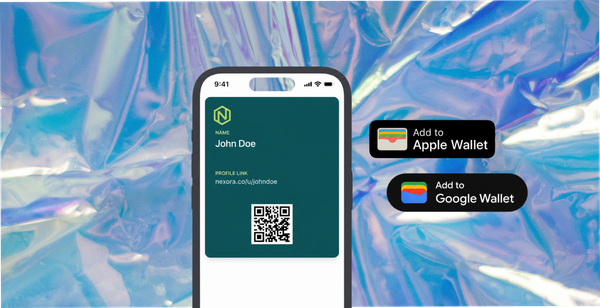
Instead of a confirmation message, the customer receives a card that saves to Apple Wallet or Google Wallet in one tap. No app, no account, no download.
That card can be two things.
A reward. A discount, a voucher, a credit. Something worth having, arriving in seconds, while the customer is still holding the phone.
A contact card. Your details, a link, a way back. No expiry, lower value to the customer, but it keeps you one tap away instead of one search away.
The difference from a confirmation screen is that the pass persists. It sits in the wallet after the tab closes, which turns a one-off form response into somewhere you still exist on their phone.
Our guide to turning a form into a wallet pass covers the mechanics end to end.
What You Give Up by Leaving Google Forms
Being honest about this, because the trade is real.
The spreadsheet. If your workflow genuinely is "responses to Sheets, then pivot table", moving means rebuilding that. Most tools export, but export is a step.
Free at any volume. Google Forms has no submission cap. Almost every alternative, including free tiers, has one.
Familiarity. Everyone in your organisation already knows how to build a Google Form. Any new tool has a learning cost, even a small one.
The right question is not which tool is better. It is whether the ending matters to you. If a confirmation screen is fine, Google Forms is unbeatable at the price. If the moment after the customer answers is worth something, that is the thing to buy.
Moving Off Without Losing Anything
Two practical steps people skip and regret.
Export your responses before you change anything. A year of answers is genuinely useful and it is easier to download now than to retrieve later from an account somebody has stopped maintaining. Take the sheet, keep it somewhere you own, and do it while everything still works.
Redirect the old form rather than deleting it. Old forms get linked from emails, printed material and other people's pages. A form that returns an error tells the visitor your business is untidy. A short page pointing at the new one does not.
Then check it on a real phone of each kind. Most form traffic is mobile, and iPhone and Android differ on keyboard behaviour, file uploads and how a wallet pass saves. Your audience split varies by market and StatCounter is the quickest way to check yours, but both are large enough everywhere that testing one is testing half.
How 82DASH Fits
82DASH is a customer content library. The part relevant here is the form and wallet builder: a branded form that ends with a pass in the customer's Apple or Google Wallet.
The free plan is genuinely free, covering branded forms and wallet passes up to 50 submissions a month. That is enough to run a real campaign rather than a demo, and it is the sensible way to find out whether your customers actually save the pass.
Three things it does that a form builder does not.
The form is yours, not a template with your logo on it. Colours, wording and the pass design.
The ending is a pass, not a message. A reward or a contact card, saved in one tap, with no app on either side. The tips page on contact card or reward card covers which to pick.
You can reach them afterwards. The pass supports notifications, within the platform limits, which means the form is a beginning rather than an ending.
Photo and video collection sit on the paid plans, and Starter and Growth include a seven-day trial. Monthly plans start at $50, with around 15% off annually. The pricing page has the detail.
Underneath it: pay your customers, not creators.
Start free with forms to Apple and Google Wallet
Isabelle Simon, Communications Lead, 82DASH
FAQs
What is the best free alternative to Google Forms?
It depends which problem you have. For design, Tally and Typeform's free tiers. For features and integrations, Jotform. For a form that ends in something the customer keeps, a form and wallet pass builder. If your form is internal, Google Forms is still the best answer.
Is Google Forms good enough for customer-facing use?
It works, and it looks like Google Forms. For a business asking customers for feedback or details, the form is a brand surface, and a borrowed-looking one costs completions. It also ends at a confirmation screen, which spends the most valuable moment in the whole interaction on nothing.
Can Google Forms send a reward automatically?
Not on its own, and the workaround has a cost. Google Forms can email a confirmation through an add-on, and you can wire it to a rewards tool through an automation layer, which works and means two subscriptions and a connector to maintain between them. A tool that issues the pass directly removes that chain.
Do customers need an app to receive a wallet pass?
Not one of yours, and there is no 82DASH app to download. Apple Wallet is built into every iPhone. Google Wallet is available on supported Android devices and may already be installed, with availability varying by country and device. The customer taps once to save.
What happens to responses if I move off Google Forms?
Export before you cancel anything. Responses accumulate into something genuinely useful over a year and you want them in your own storage rather than trapped in an account you have stopped using.
Is there a free plan that includes wallet passes?
Yes. The 82DASH free plan covers branded forms and Apple and Google Wallet passes up to 50 submissions a month. Photo and video collection are on the paid plans.