How to Add Apple Wallet Loyalty to Your Shopify Store
Apple Wallet loyalty cards install in one tap, require no app download, and reach almost every cardholder with push notifications. Here is how to connect them to your Shopify store.
Most Shopify brands running a loyalty programme are using email as the primary communication channel. A points update arrives in the promotions folder. A reward reminder gets filed alongside every other marketing email the customer receives. The open rate is around 20% on a good week.
Apple Wallet loyalty works differently. A digital loyalty card installed on the customer's iPhone lives in the Wallet app alongside their boarding passes and payment cards. When their balance updates, a notification appears on the lock screen. When a reward is about to expire, another one does. The open rate for wallet pass notifications is approximately 99%.
Setting this up for a Shopify store does not require a custom app build or a development team. This post covers what Apple Wallet loyalty is, how it connects to Shopify, and the practical steps to launch it.
"Push notification = great for instant action. Push feels underrated because it's simple but open rates are usually much higher than email." — r/user/vishakhasharma098
What Apple Wallet Loyalty Actually Is
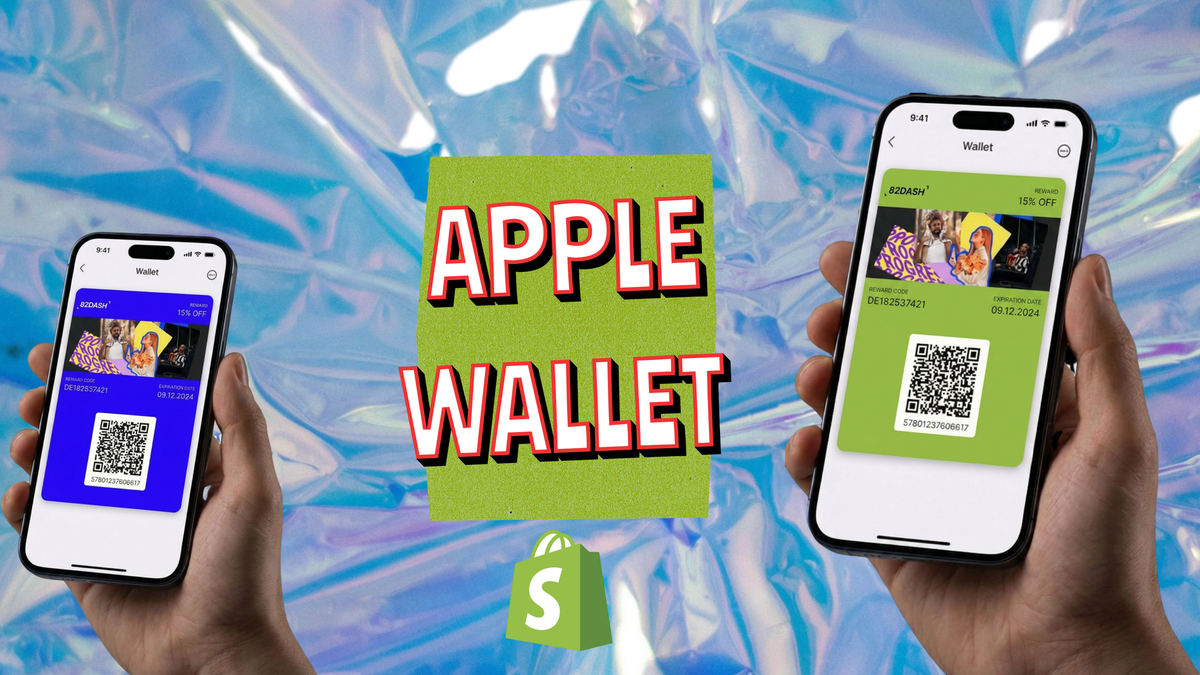
Apple Wallet loyalty is a digital card issued by a business to a customer's iPhone. The card installs by tapping a link - no download, no account creation, no App Store. Once installed, it sits in the Apple Wallet app alongside payment cards and boarding passes, accessible from the home screen.
The business controls the card remotely. A loyalty balance can be updated after each purchase. A reward can be added when the customer crosses a threshold. A push notification can be sent to every cardholder simultaneously when a promotion runs. None of these actions require the customer to do anything - the card updates on their phone and the notification appears on their lock screen.
Apple's underlying technology is WalletKit, formerly Passbook. The card format is a .pkpass file that Apple Wallet understands natively. Third-party platforms generate and distribute these files, which means businesses can issue, update, and send push notifications to Apple Wallet cards without any development work.
For Android users, the equivalent is Google Wallet. Third-party platforms that support both formats generate either automatically based on the customer's device.
Why Loyalty Apps Do Not Work for Most Shopify Brands
The standard alternative to wallet passes is a loyalty app: a native iOS and Android application that customers download, create an account in, and check when they want to see their balance.
The adoption mechanics are the problem. The customer has to find the app in the App Store, download it, create an account, and log in. Each step reduces the proportion of customers who continue. For brands selling a single product category, most customers will not download a dedicated app because the effort is not proportional to the value of the loyalty programme.
Apple Wallet removes each of these steps. The customer taps a link sent in an order confirmation email or a post-purchase message. Their phone shows a native "Add to Wallet" prompt. Tapping "Add" installs the card. Total time: under ten seconds. No App Store visit. No account. No login.
This difference in adoption mechanics changes what loyalty programmes can realistically achieve. A programme only 5% of customers engage with has limited commercial impact. A programme 40-60% of customers install in one tap has a different reach entirely.
Apple Passbook vs Google Wallet: The 2026 Comparison covers the technical differences between the two platforms and what they mean for Shopify brands running both.
Connecting Apple Wallet Loyalty to Shopify
The connection between Shopify and Apple Wallet loyalty has three components: the trigger, the pass, and the update.
The trigger is the Shopify event that causes the loyalty system to act. Common triggers include: order placed (customer earns points), order fulfilled (pass is issued if this is the first purchase), reward threshold reached (pass updates to show a new reward), or content submission received (customer submits a photo and earns a bonus).
The pass is generated by a third-party platform when the trigger fires. The platform creates a .pkpass file personalised with the customer's name, their current balance, and any reward details, and sends it to the customer via the email address recorded in Shopify. The customer taps the link in the email to install.
The update happens when the trigger fires again - when the customer makes another purchase and their balance changes, the platform updates the pass on their phone without any action from the customer. A push notification can accompany the update or be sent independently.
Third-party platforms that handle this include PassKit, Walletly, and Passes.com, each of which offers Shopify integrations. For brands also running a customer content programme, 82DASH connects the content collection flow to wallet pass reward delivery in a single system.
Designing the Loyalty Card
Apple Wallet loyalty cards have a defined visual structure. The card has a strip area at the top (typically showing the business logo and a colour field), a primary field showing the most important value (usually the points balance or reward status), and secondary and auxiliary fields showing supporting information.
The design constraints are actually an advantage. Apple Wallet cards look like Apple Wallet cards - which means they sit naturally alongside the other cards in the customer's Wallet app. The customer does not need to learn a new interface. The familiar format is what makes the experience low-friction.
Key design decisions:
- Strip colour: This is the brand's most prominent brand colour, used as the background for the card's header strip. It should work at full saturation on a mobile screen.
- Primary field: What the customer sees at a glance. For stamp-card style loyalty this might be "5 of 10" or for points-based programmes, the current balance.
- Expiry logic: Whether rewards expire, and if so, when. Expiry creates urgency but also creates disappointment if customers miss it - make sure the push notification timing gives them enough warning.
- Back panel content: The card back is where detailed terms, links, and additional information sit. A link to the current brief (for content programmes) or the redemption instructions can go here.
Types of Apple Wallet Loyalty for Shopify
Stamp cards - the digital equivalent of a paper stamp card. Each purchase adds a stamp; reaching the total unlocks a reward. The card shows current stamp count. The push notification fires when the customer is one or two stamps away from their reward.
Points programmes - points accumulate with each purchase and redeem against future orders. The card shows the current balance and any active reward thresholds. Push notifications announce bonus point events or expiring rewards.
Tiered membership - the card shows the customer's current membership tier (Bronze, Silver, Gold). Tier upgrades push as a lock screen notification. Different tiers display different card designs, making the upgrade feel tangible.
Content collection rewards - for brands running a customer content programme alongside their loyalty programme, the wallet pass is the reward delivery mechanism. A customer submits a photo or video, the pass updates with a reward credit immediately, and the notification announces the credit. The reward for content submission and the ongoing loyalty balance live in the same card.
How to turn a form into an Apple or Google Wallet pass covers how submission forms connect to pass generation for content collection reward programmes.
What to Expect: Adoption and Retention Impact
The adoption rate for wallet passes is consistently higher than loyalty app download rates for the same customer base, because the installation mechanic is fundamentally simpler.
The retention impact follows from the notification behaviour. A loyalty programme that communicates via email reaches approximately 20% of its members with each message. A wallet pass programme reaches approximately 99% of cardholders with each push notification. A programme that reminds customers of an expiring reward reaches almost every cardholder, not one in five.
Push notifications for wallet passes are not marketing emails - they are lock screen alerts on the customer's phone. This means the content of each notification matters. The highest-performing uses are: balance update after a purchase (confirms the transaction has been recognised), reward unlocked (announces a milestone), expiry reminder (creates urgency), and event or promotion announcement (reaches the whole cardholder base simultaneously).
Best wallet pass platforms for 2026 covers the third-party tools that handle pass generation, distribution, and notification sending, with pricing and feature comparisons for Shopify brands.
Getting Started
The fastest route to Apple Wallet loyalty on Shopify is a third-party pass platform with a pre-built Shopify integration. The setup sequence is:
- Choose a platform that supports both Apple Wallet and Google Wallet (reach all customers regardless of device)
- Design the card template using the platform's editor - no development required
- Connect to Shopify via the platform's integration to set the triggers
- Test the installation flow: place a test order, receive the pass link, install the card, verify the balance shows correctly
- Set up the first push notification: a welcome message sent when the card installs
The whole setup can typically be completed in a single session. The complexity scales with the programme structure - a simple stamp card is significantly faster to configure than a multi-tier points programme with bonus events.
For brands that want content collection, rights clearance, and wallet pass reward delivery managed together from the same Shopify app, 82DASH connects all three into a single post-purchase flow.
Isabelle Simon - Communications Lead - 82DASH
Frequently Asked Questions
Do customers need to download anything to use Apple Wallet loyalty?
No. Apple Wallet is pre-installed on every iPhone. The customer receives a link - typically in an order confirmation email - taps it, and sees a native "Add to Wallet" prompt. Tapping "Add" installs the loyalty card in under ten seconds. There is no App Store visit, no account creation, and no login required.
Does Apple Wallet loyalty work for Android customers too?
Apple Wallet only works on iPhone. Android users receive a Google Wallet card instead. Third-party pass platforms generate both formats from a single template and detect the customer's device automatically when they tap the installation link - so the same programme works for both iPhone and Android users without any additional configuration.
How does the loyalty card update when a customer makes a purchase?
When the customer places an order on Shopify, the trigger fires in the connected pass platform. The platform updates the customer's pass data (points balance, stamp count, or reward status) and pushes the updated card to their phone. The customer sees a lock screen notification and the card reflects the new balance immediately. The customer does not need to open anything or take any action.
What can wallet pass push notifications say?
A push notification is a short text message - typically one to two lines - that appears on the customer's lock screen. Common uses include: "You've earned 50 points on your last order", "You're one stamp away from your free reward", "Your reward expires in 7 days", or "New offer available on your loyalty card". Notifications are sent through the pass platform and reach approximately 99% of cardholders.
How is Apple Wallet loyalty different from a Shopify loyalty app?
A Shopify loyalty app requires a customer to download a separate application, create an account, and log in to check their balance. Apple Wallet loyalty requires a single tap to install a card that is already in an app pre-installed on their phone. The practical result is significantly higher adoption rates and a direct push notification channel that reaches almost all cardholders, compared to the email and in-app notification channels that loyalty apps rely on.